AutoMounterShell
A shell wrapper for Linux where you can mount and unmount drives without commands.
header
╔═════════════════════════════════════════════╗
║                                             ║
║          AUTO MOUNT SHELL (AMSH)            ║
║            ITBI – Proiect 2025              ║
║       By me & Iosub Dragos                  ║
║                                             ║
╚═════════════════════════════════════════════╝
overview
AMSH (Auto Mount Shell) is a custom command-line interpreter designed for Linux systems to automate the management of storage devices. Developed in collaboration with Iosub Dragoș-Casian, this project focuses on efficiency and resource management by handling the mounting and unmounting of file systems automatically based on user activity.
key features
AMSH enhances the standard shell experience with intelligent background processes:
- —Smart Auto-Mounting: Automatically detects when a user navigates (`cd`) to a mountpoint or accesses files within it, mounting the device instantly.
- —TTL (Time To Live) Management: Monitors inactivity and automatically unmounts devices after a configurable period to save resources and ensure safety.
- —Desktop Notifications: Integrates with `notify-send` to alert the user in the GUI when devices are mounted or unmounted.
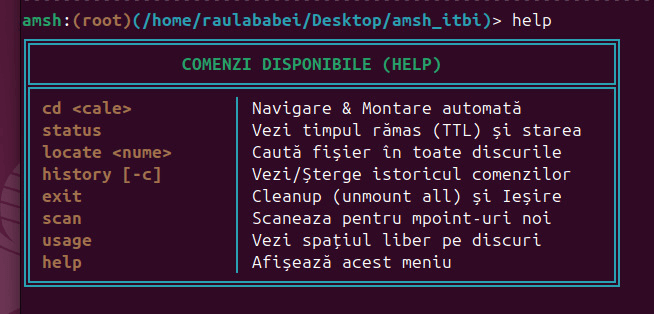
- —Custom TUI: Features a stylized ASCII interface, colored prompts showing the current user and path, and formatted history tables.
configuration
The system is highly configurable via the amsh.conf file, allowing users to define specific TTLs (in minutes) and file system types for different devices.
# DEVICE            MOUNTPOINT                FS_TYPE   TTL
/tmp/disk.img       /tmp/amsh_mnt             ext4      1
/dev/sdb1           /mnt/usb                  vfat      5
/tmp/secret.img     /tmp/amsh_secret          ext4      2
technical architecture
The project is built entirely in Bash and leverages core Linux utilities. It handles signal trapping (SIGINT) to prevent accidental closures and uses `fuser` to ensure devices aren't unmounted while in use.
- —amsh.sh: The main shell loop and command processor.
- —mount_manager.sh: Logic for mounting, unmounting, and TTL verification.
- —style.sh: Handles the TUI elements, colors, and banner generation.
- —setup_demo.sh: A utility script that creates virtual disk images to test the functionality without physical hardware.
The codebase is modularized into specific components:
logic snippet
Below is a snippet from the mount_manager.sh showing how the system checks for expired TTLs using file timestamps.
# Check time & unmount
check_and_umount_expired() {
    if [[ ! -f "$CONFIG_FILE" ]]; then return; fi

    while read -r device mpoint fstype ttl; do
        local ttl_file="$TTL_DIR/${mpoint//\//_}.last_access"

        # Check if active mountpoint
        if [[ -f "$ttl_file" ]] && mountpoint -q "$mpoint"; then
            local last_access=$(stat -c %Y "$ttl_file")
            local current_time=$(date +%s)
            local diff=$(( (current_time - last_access) / 60 ))

            # Check expiration & active processes
            if [ "$diff" -ge "$ttl" ]; then
                if ! fuser -s "$mpoint" 2>/dev/null; then
                    echo "[SYSTEM] TTL expirat. Demontare: $mpoint"
                    sudo umount "$mpoint"
                    rm "$ttl_file"
                fi
            fi
        fi
    done < "$CONFIG_FILE"
}
conclusion
AMSH serves as a powerful demonstration of shell scripting capabilities, process management, and Linux system administration automation. It transforms the tedious task of manual mounting into a seamless, background operation.
technical documentation (extract)
The project is documented extensively in the official technical report. Key chapters include:
- —Problem Description: Addressing 'Workflow Friction' and 'Stale Mounts' in Linux systems.
- —Solution Specification: Moving from reactive to 'Just-in-Time Mounting' and proactive 'Auto-Vindecare'.
- —Modular Design: Separation of concerns between the Core Orchestrator (amsh.sh), Business Logic (mount_manager.sh), and UI/UX Layer (style.sh).
- —Implementation Details: Advanced handling of path normalization, signal trapping (SIGINT), and persistent history logging.
For a deep dive into the design patterns and test scenarios used, refer to the full PDF documentation.